Showing posts with label tumblr. Show all posts

Sunday, January 22, 2017

How to: Make you tumblr feed Look Amazing

If you have viewed my blog posts for a while, you know I love my aesthetically pleasing tumblr feeds. Since it is a new year, I want to make my feed look even better. And maybe you do too. If you are like me, I seem to be looking at pretty much the same topics like: summer, beach, tumblr photography, winter, etc. And after a while, you see the same thing over and over again.

Maybe the key is to look other places than just tumblr. For example, try searching tumblr on Pinterest. Or maybe on google. I come across some great pictures there where I think "wow. that would look great with my feed."

So what to do? Screenshot that picture and post it to your tumblr.

Screenshotting a picture on Pinterest:

1. Find the picture you like


2. Click on the picture to enlarge it


3. Right click on the photo and choose the option "Open image in new tab"

4. And there you go! Now you can screenshot the picture with no problem.


How to post a picture on tumblr:

1. Go to tumblr
https://www.tumblr.com/dashboard

2. Find the icon that looks like a pencil


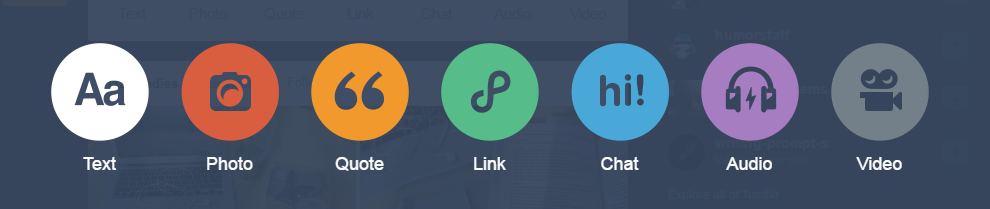
3. Click on it and select which option you want (in this case, photo)

4. Add your picture and post!


I hope you all enjoyed this post. I would love to see your tumblr feeds so feel free to tweet me a picture on twitter at @chicslifestyle. Next week's post as usual is coming out at 12:00pm EST on Sunday so stay tuned! (http://everytimezone.com/) I hope you all have a wonderful day or night whenever this is being read.

-Caroline

"Every champion was once a contender that refused to give up." -Rocky Balboa

Saturday, December 17, 2016

17.I Try to Make Tumblr Outlines

Ugh. I just can't with the amazing world of tumblr. People come up with such amazing things and are so creative! I mean look at this!


They all just look so realistic. So naturally seeing this, I wanted to see if I could do this myself. So I went onto YouTube and looked at multiple different videos to see what people used. Some people used the app Adobe Draw, but you need an account for that. I also tried the app PicsArt. So I followed a tutorial using that app and I used a Kylie Jenner picture from her Instagram.


I thought that it was going to turn out so well based on the picture below and how I was doing. Something I wonder is how long it takes to make tumblr outlines. I had little patience to do just the face.


Let's just say when I removed the picture (there were different layers) I was really disappointed. I thought that just on my first try I would get this sooo perfect looking. I also tried to make myself feel better by saying that it didn't turn out well just because I was doing it on a phone. So my next plan was to try it on my mom's iPad mini...which never happened.


Please if you have any tips, please let me know how to make my outlines better. Stay tuned for more Blogmas posts! During the week I post at 3:00pm EST and on the weekends I post at 12:00pm EST. I will be posting daily until December 24.

-CarolineπŸŽ„

Sunday, November 20, 2016

What to do: More with tumblr feed

I noticed that you all seemed to enjoy my previous post about tumblr called What to do: tumblr feed. If you missed it, go check it out!! Ever since then, I have a few new tumblr feed screenshots to show you all. And now I am going to be showing you some new ways to flaunt your aesthetically pleasing tumblr feed. So here is my tumblr feed from the past few months.


Honestly every month's feed becomes my new favorite. I honestly just want to show off my feeds so badly. In the second one I found a pink canyon that I thought was so cool. Comment down below your tumblrs so I can go check them out!

So I recently got some amazing new ideas of what to do with tumblr feeds. You print out the picture and glue it onto the cover of your notebook. And if it isn't a spiral notebook and fairly small, maybe you can wrap the whole thing in it.

I know I already showed you all DecalGirl before, but I want to show you all again.


I just can't right now. I want an apple computer so badly so I can do this. omg. I am obsessed with this, please tell me I am not the only one.

Next what you can do is print your tumblr feed out and put it on a notebook. Some teachers are like "Customize the cover of your notebook!" So now you can just use this option and it is super easy because you print out the page already in a collage format then print it out and glue it on. Here are a few more of tumblr feed pictures. Last month I just found so many good places to get pictures.


I thought that if you are enjoying any of these pictures that I find I thought why not show you all some of the tumblr accounts I am reblogging these pictures from. A lot of my reblogs have been from an account travelaway, adore-europe, and Isleofsky.

This is probably not such a great idea but this is like if you are desperate. If you need to wrap a present and you are out of wrapping paper you could always print out your tumblr feed and use it as some literal wrapping paper.

I hope you all enjoyed this post. I know this may not have been as epic as my last what to do with your tumblr feed but let me know of other ways you can use your tumblr feed and if you want to see more of this what to do with your tumblr feed. Overall what kind of posts do you want to see?

Lots of love,
- Caroline


Sunday, September 4, 2016

What to do: tumblr feed

I think my tumblr feed is pretty aesthetically pleasing. When I look at it I guess it seems to relax me or something. I use tumblr as a way to find pretty pictures and put them together in a theme. I don't know what kind of theme it is, let's just call it Caroline's theme. Here are a few screenshots of my tumblr feed.


And as I took pictures of my tumblr theme, I got an amazing idea. Your tumblr archive, is basically a collage. And I have used this website before called DecalGirl where you can create skins and cases for your electronic devices and I thought your tumblr feed would be such a great idea to use!

So I went onto DecalGirl and I picked a random computer to try one of my instagram feed pictures, and was so shocked on how well it actually turned out. Soooo, I created a DecalGirl account, ChicLifestyle, so now you all can see the design for yourself. Check it out!


Also another thing you could do with your tumblr feed is just to print it and have a collage up in your room. I am just so obsessed with my instagram feed, that I decided to take 2 more screenshots and show you all.


So there you have it! What you can do with your tumblr feed other than look at it. I mean, those hours of searching shouldn't just go to waste, flaunt it!!!! I hope you enjoyed this post, comment below what kinds of posts I should create next. New posts every Sunday, love you all πŸ˜˜.

- Caroline πŸ˜˜πŸ˜˜πŸ˜˜πŸ˜˜πŸ˜˜πŸ˜˜